
Workflow overview
EandoX simplifies how you maintain, inspect, and update your product's supply chain data. The platform is flexible and scalable, adapting to any stage of your sustainability journey with incremental implementation options. We've put special emphasis on making it easy to collect accurate data from your suppliers, as that is often the most time-consuming and error prone part of the process.
Supplier products
Most manufacturing processes involve components from suppliers. When using these supplier-sourced components (also called Supplier products), you can either create the product data yourself or invite your suppliers to join EandoX and let them share their component data directly.
When suppliers create their own supplier products, you get accurate data that automatically updates whenever they modify their manufacturing processes.
Data from EPDs
In addition to supplier data, EandoX includes data from Environmental Product Declarations (EPDs). These are standardized documents that provide verified environmental impact information for products. Each EPD is created by manufacturers, independently verified by third-party organizations and imported by the EandoX team.
Quick terminology
Entity
An entity refers to the different types of data that you can create in EandoX. The entities are Product, Component, Material, Packaging, Factory, and Transport.
Product
A product entity represents the end result of your manufacturing process. This is what you will be working with the most. All other entities are connected to one or multiple products.
An example of a product is an armchair.
Component
A component entity represents a reusable sub-assembly of a product (or another component). They can be created by you, or requested from your suppliers.
An example of a component is a cushion. This cushion could be used once in different models of an armchair, and/or multiple times in a sofa.
When you change the properties of a component, these changes will be reflected in all products that use this component.
Material
A material entity represents the raw material that is used to create a product or component.
All data on materials is created by us using historical data from the industry. Missing materials can be requested from EandoX.
An example of a material is cotton.
Packaging
A packaging entity is a collecetion of materials that is used to package a product.
An example of a packaging for an armchair could be a Large Cardboard Box, 10m of Plastic Wrapping and a Medium Pallet.
Factory
A factory entity represents the location where your product is manufactured and/or assembled, and what environmental impact the manufacturing process has.
Transport
A transport entity is the vehicle used to transport your product and/or its parts.
An example of a transport for an armchair could be boat and truck.
Supplier
A supplier is the company that manufactures components that are used in your products.
You can invite suppliers to create declarations of the products you order from them. Allowing suppliers to create their components themselves allows the data to be more correct and up to date. It removes the need for regular check-ins with suppliers and reduces the need for NDAs.
Process
A common workflow is as follows:
1. Add supplier components
If your product uses components sourced from suppliers, add those supplier products to your library.
If your supplier is already connected to EandoX (or has an imported EPD):
- Add the supplier products to your library.
- If the required supplier product doesn’t exist yet, subscribe to the supplier, then send a request to the supplier to create it.
If your supplier is not connected to EandoX yet:
- Invite your supplier to join EandoX.
- Request that they create the components you need.
- In the meantime, you can create placeholder components yourself and later replace them with the supplier’s official components.
2. Handle reusable sub-assemblies
If your product includes sub-assemblies that are reused across multiple products you can create them as separate products or components.
Create it as a component if the sub-assembly is never sold separately.
Create it as a product if the sub-assembly is sold separately, and should be treated as a separate product.
3. Create a product
When any potential supplier products and/or sub-assemblies are added to your library, you are ready to create the product you want to declare.
4. Attach relevant entities to your product
Link all the necessary entities to your product, such as other products, supplier products and materials.
- If it's your first product, you can use generic data for transport, packaging, and factory.
- If you're an advanced user, you can create your own transport, packaging, and factory data.
The product improvement cycle
EandoX is a great platform for not only tracking your products current performance, but also for improving it over time. This work can be split up into a cycle of four steps:
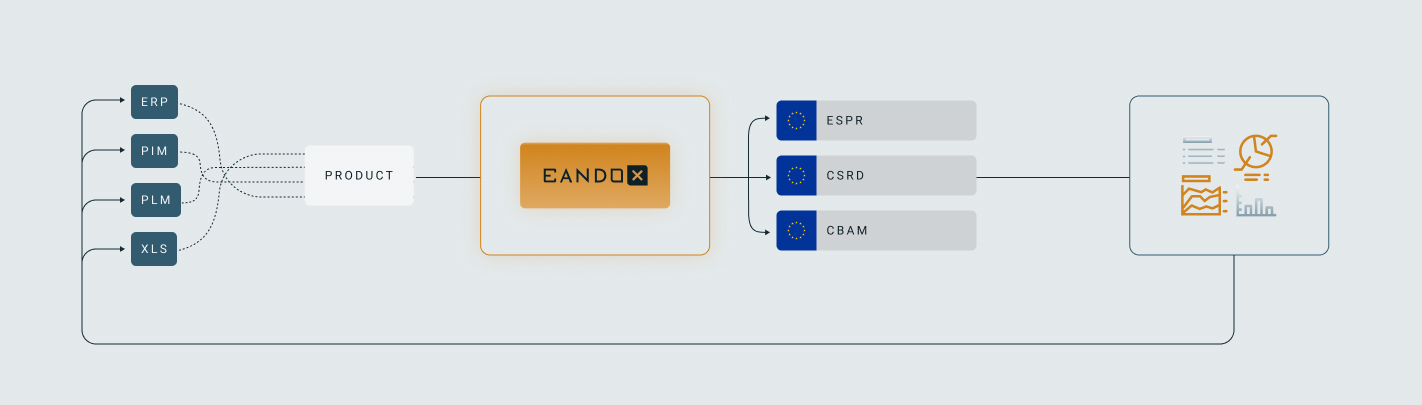
Collect
Collect your product data in a structured and efficient manner. Combine manual data collection with automation and integration to build a scalable data management process that grows alongside your sustainability efforts and goals.
A streamlined and systemized approach ensures dynamic improvements in data quality while maintaining full traceability.
Measure
Using EandoX you can structure, control and manage the collected data in an efficient way. The platform's robust data structure is key to making sure that the model is scaling with your businesses maturity.
Report
The built-in tools in EandoX are designed to meet all your reporting needs, ensuring you stay compliant with legal regulations while also addressing market demands. Whether you're reporting for regulatory purposes, such as EU regulations, or for customer-facing sustainability initiatives.
Reduce
Tracking your product’s life cycle trends allows you to find environmental sinkholes.
Emission reduction doesn’t need to be in the initial strategy, but all the previous steps are key to making an efficient reduction journey.
Next steps
You can read about the product creation process in detail here, or check out the product creation quickstart guide for a quicker overview of all the essential first steps.